Factory Raid bot
Note
This bot is made for the Blox Fruits game, as of 13/02/2026.
The code for this bot is available in https://github.com/Mews/pyrobloxbot-examples/blob/main/factory-raids/main.py
The screenshots used for the bot were taken in a 1920x1080, 15.6 inch screen (see why this matters in the image recognition guide)
In this example, we’ll make a bot that farms factory raids on a private server in Blox Fruits, letting us get tons of fruit rolls automatically.
The basic premise will be the following:
Afk until a factory raid happens.
Go to the factory and kill the core.
Store the fruit we got.
As we’ll see in bellow though, each of these steps is actually more complicated than it seems, and requires some creativity to accomplish.
Setting things up
The first thing we’ll consider is everything we need to setup. You might think there’s not much to this, but it’ll make or break our bot.
Here’s what our setup will look like (all these decisions will be explained later):
Make it so nobody except us can join the private server.
Our sword doesn’t move the character when attacking.
Camera shakes are off.
We use the exact same loadout we were using when making the bot.
Our home is set to the cafe.
Our fruit is in slot 2.
Our sword is in slot 3.
New fruits go to slot 6.
We’re running, not walking (toggled in game using control)
That’s a lot! Hopefully now you realize how important it is to consider everything when making a bot.
Because our bot just blindly executes actions, even the slightest change, like swapping the items in two slots, will break the bot.
Waiting for a raid
We need to make sure that we don’t get kicked out of the server while we wait for the raid.
This is easy enough, we’ve already seen how to make an anti afk bot. We’ll just slightly change the code to fit our bot.
We’ll define a function to move around in a random direction, like this:
import random

def move_randomly():
    directions = ["l", "r"]
    d = random.choice(directions)

    bot.jump()
    bot.walk(d, duration=1)
And now this is where our first design choice becomes important.
See, we’ll check if a raid has started by checking if the bossbar is visible on screen.

The screenshot we’ll use to check if a raid has started.
But we must keep one thing in mind: the bossbar only appears if we’re close enough to the factory (it appears when we’re inside the cafe)
This is why it was important for us to set our home in the cafe (it isn’t the whole reason though).
This is where we’ll want to move around while afk, because then we know that we’ll be able to see the bossbar.
This is also why we only walk left and right (so we don’t leave the cafe), and jump once before walking (in case we sit in any of the chairs inside the cafe).
So this is how the waiting part of our bot looks like:
Notice also that we’re facing perfectly straight forward, and shift lock is enabled…
This is very important, and it will be explained in the next section.
Now, we just need to identify when a raid has started.
def raid_going_on():
    return bot.image_is_visible("bossbar.png")
When this function returns True, we move on to the next step.
Getting inside the factory
The previous step just involved moving around randomly. Where or how we moved wasn’t very important.
This isn’t the case for this step. We need to control with precision how we move.
Our bot doesn’t know where the character is, it can’t correct for any errors when moving like we do without thinking when playing.
This is why looking perfectly forward and having shift lock enabled in the previous step was important.
Because the direction we move in depends on where we’re looking, if we didn’t know exactly the angle we were looking, there would be no hope of making the bot work.
Notice how we end up in very different spots from changing the camera angle slightly.
The way we can look perfectly straight ahead is by resetting the character. In Blox Fruits, resetting the character also resets the way the camera and character face. We then enable shift lock, to keep the character looking that way.
Lets define a function to normalize our camera angle:
def setup_camera_angle():
    bot.toggle_shift_lock()
    bot.reset_player()
    bot.wait(5) # Wait to respawn
Ensuring consistent movement is also why we:
Turned off camera shakes.
There are random events in Blox Fruits that can happen that cause our camera to shake, causing the same issue we just fixed by facing straight forward.
Made sure to use the exact same loadout we were using when making the bot.
Everything from your loadout might change your movement speed.
Made sure we were running, not walking.
This obviously also changes our movement speed.
Now that we know that our movement is consistent, we can actually get our bot to the factory.
The first thing we need to deal with, is the fact we don’t know where afking left our character. We need to get our character to a consistent position!
To fix this, we’ll reset our character.
Our problem is still not over though. If you reset your character a few times, you’ll find that you can actually get teleported to one of a few positions inside the cafe!
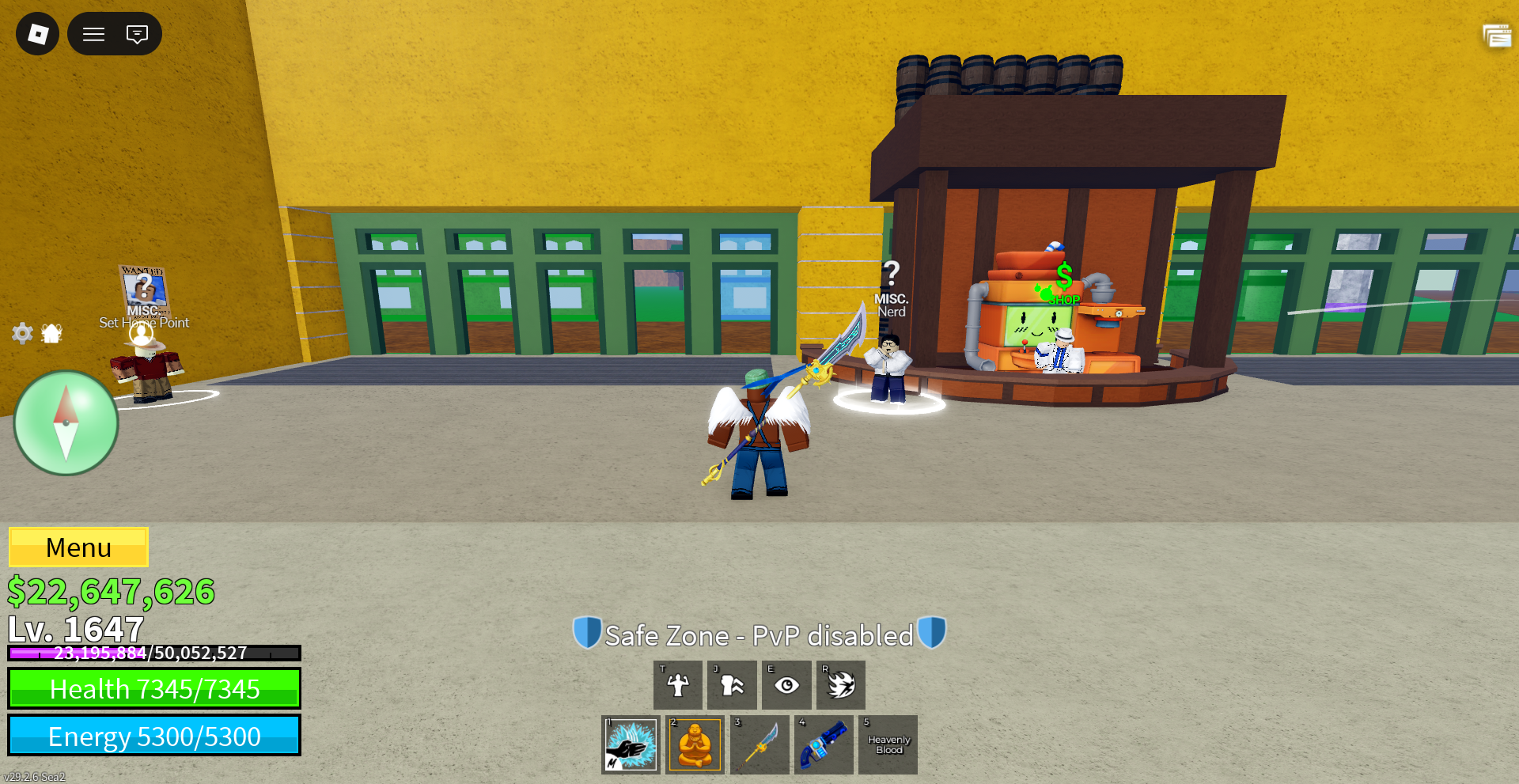
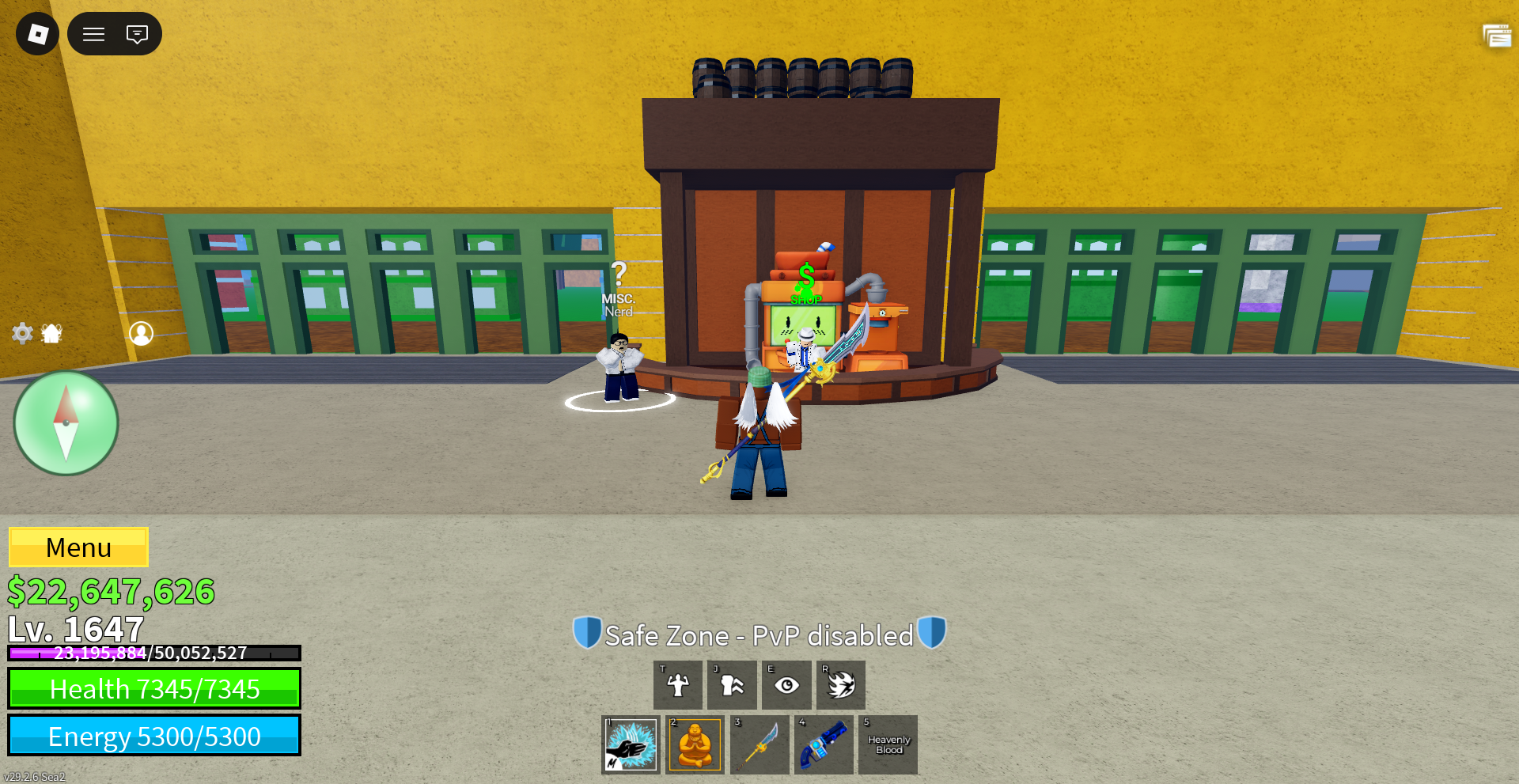
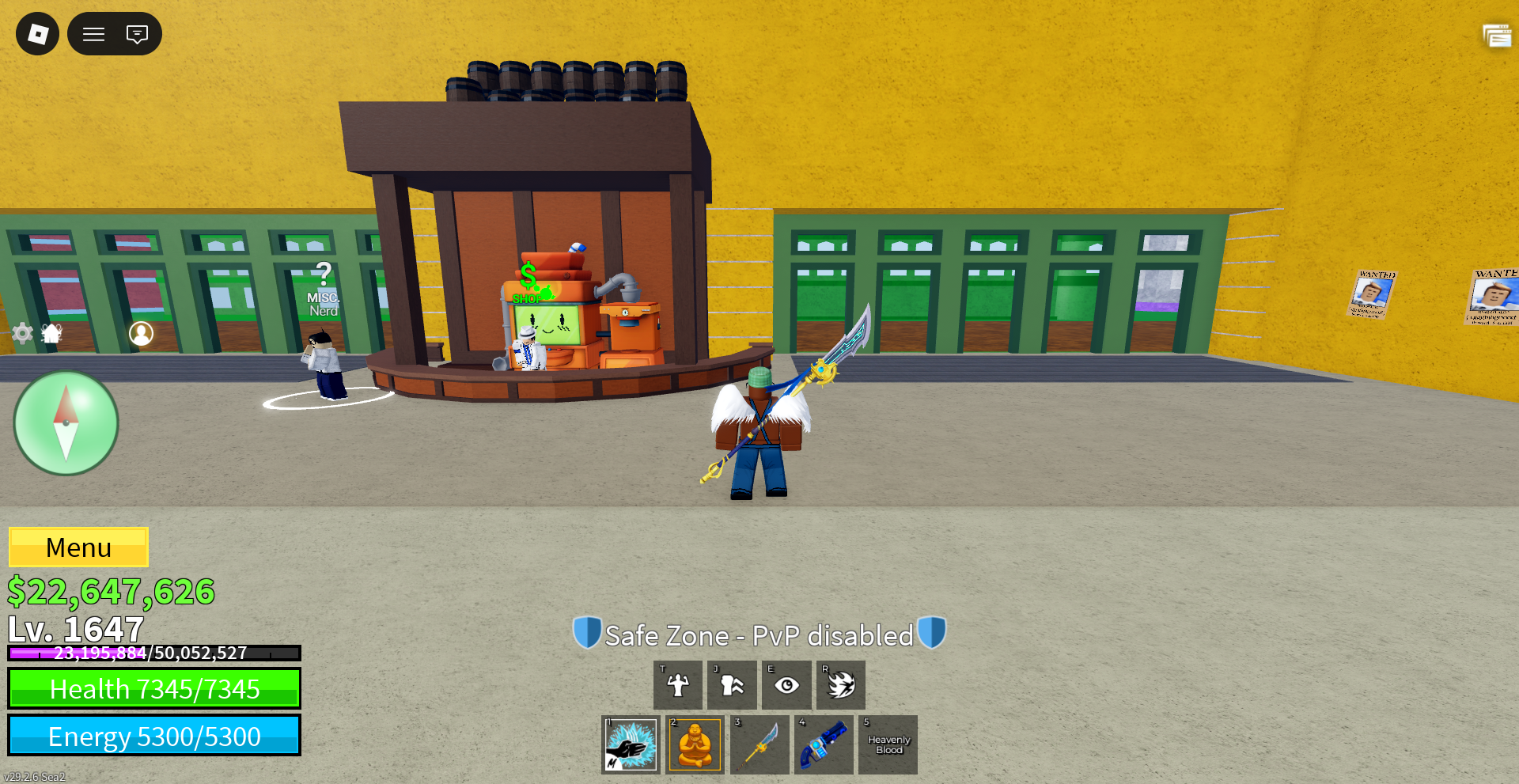
You’ll notice though that they all sit along a line across the cafe. If we walk to the right for long enough, no matter where we teleport, we will end up in the same position up against the wall!
If we walk right for say 5 seconds (long enough for any of the positions to reach the chair), we can be 100% sure of our position!
In this case, sitting on the chair makes our position even more consistent!
From there, here’s how we get inside the factory (with my loadout):
Jump twice to leave the chair and not get stuck in the other one.
Walk forward for 2 seconds.
Walk right for 1.5 seconds.
Walk forward and right for 12.5 seconds.
Figuring the particular lengths just comes down to experimentation. Reset, try getting to the factory, change some values, reset… you get the point.
Our function will look like this:
def walk_to_factory_door():
    bot.walk_right(5)
    bot.jump(2)
    bot.walk_forward(2)
    bot.walk_right(1.5)
    bot.walk("f", "r", duration=12.5)
Killing the core
At the factory door, we will first wait 10 or so seconds, just to be 100% sure the door is open.
Then, we will:
Walk next to the core.
Activate the buddha transformation (Probably not necessary to have the buddha fruit, but I was using it sooo :P)
Walk right up to the core.
Jump up high enough to be above the core.
Walk forward a bit in the air.
Attack the core.
Walking next to the core is easy enough, we just walk forward and right for 2.5 seconds.
Then, we jump 3 times. We’ll use a 0.1 second delay between jumps, to make the most out of each jump.
While in the air, we activate the buddha transformation. The reason we do it in the air, is because transforming on the ground causes the character to jitter, making it’s position unreliable again. If we do it in the air, no jittering!
Activating the buddha transformation is also easy, we just equip the second slot (this is why we made sure to have our fruit there!), and hit Z.
Then, after landing, we walk right and forward again for 1 second, putting us right up against the tower.
Then, we jump up four times, also with a 0.1 interval.
While in the air, we walk forward and right for 0.75 seconds, landing on top of the core.
Now, we just need to attack the core. We’ll use our sword main attack to damage the core.
This is why we had to make sure we used a sword like Bisento, that doesn’t move the character when attacking. If it did, then we’d get moved out of the core after attacking it a few times.
In theory, we could just get our character back on top of the core, but the simpler and the less actions the bot has to do, the more robust it’ll be. And since raids only happen once every 1:30 hours, we don’t want to waste a single one.
This is also why we made sure to have the sword in the third slot, so we can equip it.
We also need to left click the mouse, since there’s no way to use the sword main attack using the keyboard. For this we’ll use pyrobloxbot.mouse_left_click()
Note
In this case, using the mouse is fine and reliable for two reasons:
We won’t be moving the mouse at all, just left clicking.
The mouse will always be in a predictable position, thanks to shift lock being enabled.
We can’t use our raid_going_on function to hit the mouse left button until the core is no longer alive, because remember the bossbar will stop looking the like screenshot as the core’s health starts going down. We will just hard code it to press the left mouse button 100 times.
So, our kill_core function might look like this:
def kill_core():
    bot.walk("f", "r", duration=2.5)

    bot.equip_slot(2)
    bot.jump(3, interval=0.1)
    bot.press_key("z")

    bot.walk("f", "r", duration=1)

    bot.jump(4, interval=0.1)
    bot.walk("f", "r", duration=0.75)

    bot.equip_slot(3)

    for _ in range(100):
        bot.mouse_left_click()
Hooray! We managed to complete an entire factory raid automatically!
Storing the fruits
So, we got our fruit, all that’s left is to store it!
First, we’ll pickup the fruit on slot 6 (this is why we made sure new fruits ended up there!)
You might think we’ll need to use the mouse again to interact with the fruit, but we can actually hit the backspace key to do the same thing!
We need to wait one or two seconds for the menu to open.
Then, we’ll use ui navigation to hit the store button.
After, we will reset the character, because there’s no way to close the success message using ui navigation.
Resetting also puts us in the same state as the bot started, which is what we need to run the bot on a loop.
def store_fruit():
    bot.equip_slot(6)
    bot.press_key("backspace")
    bot.wait(3)

    bot.toggle_ui_navigation()
    bot.ui_navigate("down", "up", "click")
    bot.toggle_ui_navigation()

    # Be absolutely sure the fruit finished storing
    # Because resetting will delete the fruit
    # Could also potentially use image recognition for this
    bot.wait(5)

    bot.reset_player()
And we’re done! We can now use these steps to automatically farm fruits overnight!
Final notes
You might not realize looking at this guide, but this bot is the result of many many hours of failing and fixing issues. Even more so for this bot, because raids only happen every 1:30 hours, so testing the entire thing is hard.
This bot is pretty comprehensive in terms of showing common things you might need to do to make your bots, like:
Ensuring you know exactly where your character is before doing a step.
Considering every possible thing that might happen (always remember Murphy’s law)
It also shows just how important it is to use every feature the game provides to your advantage:
Picking a sword that doesn’t move you.
Turning off camera shakes.
Setting our home in the cafe.
It was also the bot that motivated the making of pyrobloxbot :)